Best practices for using visibility modifiers

Yesterday, we talked about Typescript visibility modifiers in the context of Angular classes. Today, I want to focus on best practices and common scenarios that involve such visibility modifiers.

First, it’s very common to have Angular services that use RxJs Subjects. Subjects are somewhat dangerous because they can be used to emit data to all subscribers. As a result, it makes sense to “hide” a subject by making it private and then expose an Observable out of it as follows:
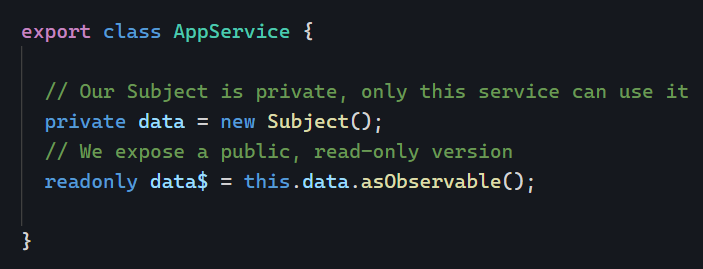
Note that we don’t need to make data$ public, because any field that isn’t private or protected is public by default. Using readonly enforces that other components/services cannot assign a new value to data$. As a result, the above code is safe: The business logic that decides when and how to emit data is “hidden” in our service (where it belongs), and yet the rest of the application can be notified when the data changes without being able to break that process by accident.

Of course, the same idea applies to Signals (see my best practices for Signals)

Another option suggested in that post is to define a getter method that returns the read-only object:
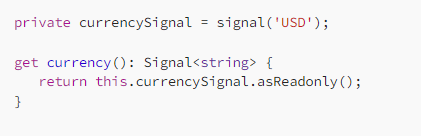
This is equivalent to using readonly. The value can’t be changed because we define a getter and no setter.

Let’s complete our best practices list from yesterday:

  1. Make every member private by default
  2. If the member is needed in the template of a component, make it protected
  3. If the member is meant to be fully public, go with public
  4. If the member should be accessible but not modifiable, use readonly or a single getter with no setter

Typescript visibility modifiers

Angular is mostly about Typescript classes, and Typescript classes have modifiers that alter the visibility of class members: public, protected, private, and readonly. Here is what you need to know about them.

Everything is public by default

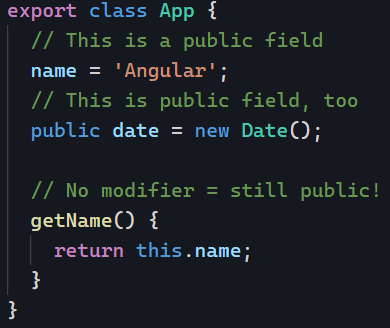
If you don’t use a modifier on a class member, it is public by default. Any other class can see and use that member and change its value:

private means that the member isn’t visible outside of the class (including a component’s HTML template)

private is a way to enforce that other classes cannot access a member of your class. Used in a component, this indicates that we do not want that property to be used in the component’s HTML template. In a service, this suggests that we don’t want other components/services to see that member:

protected is in-between public and private. It makes the member accessible in a component’s template without making it fully public.

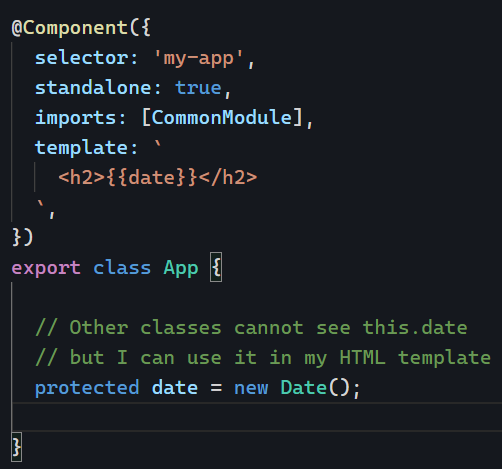
In the following example, our component property date is invisible from other Angular code in our app, but our HTML template can use it:

Best practice – My recommendation

If you want to stick to simple rules that make sense and are the safest, here’s what you can do:

  1. Make every member private by default
  2. If the member is needed in the template of a component, make it protected
  3. If the member is meant to be fully public, go with public

Tomorrow, I’ll add a couple more suggestions by introducing the readonly modifier. Stay tuned!

ngSwitch directive

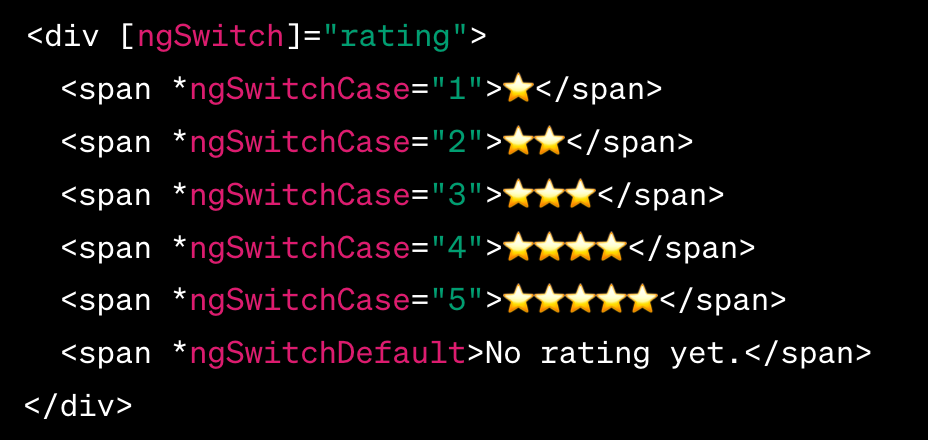
The ngSwitch directive is a good alternative to ngIf if you have to handle more than two scenarios.

It works similarly to a switch statement in traditional programming languages, allowing you to define a set of cases and associate each case with a specific template block to be rendered. For instance:

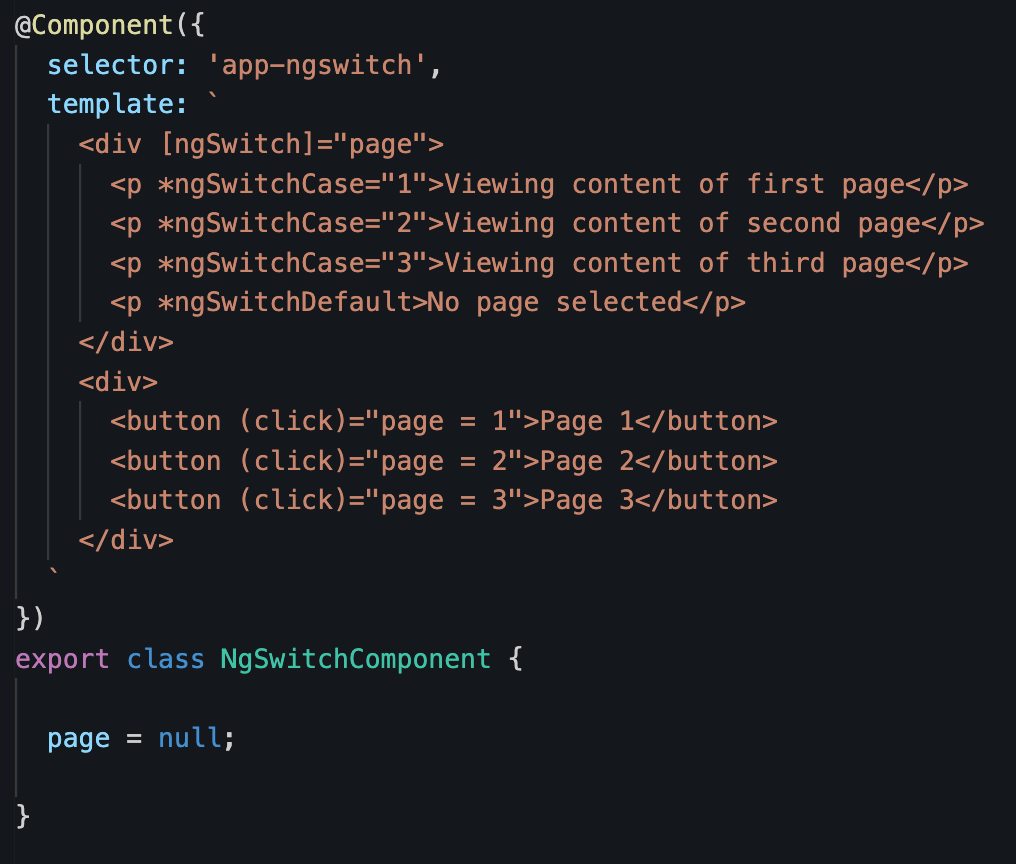
One of my favorite use cases is for basic pagination in a component (or an image carousel, for instance) where clicking on navigation buttons changes a value that triggers a different “case”:

Clicking on the buttons changes the value of page and displays a different template. Applying this to components instead of HTML elements is especially powerful. For instance: <app-hello *ngSwitchCase="3"></app-hello>

You can see an example in action on Stackblitz here.

How to create custom directives?

I’ve touched on when it makes sense to create custom directives , how to use bindings in directives, and how to get creative with Angular selectors.

Today, let’s tackle how to create custom directives. The first thing to do is to use the Angular CLI:

ng generate directive [name]

or ng g d [name]

It’s also possible to generate standalone directives with the --standalone option:

ng generate directive [name] --standalone

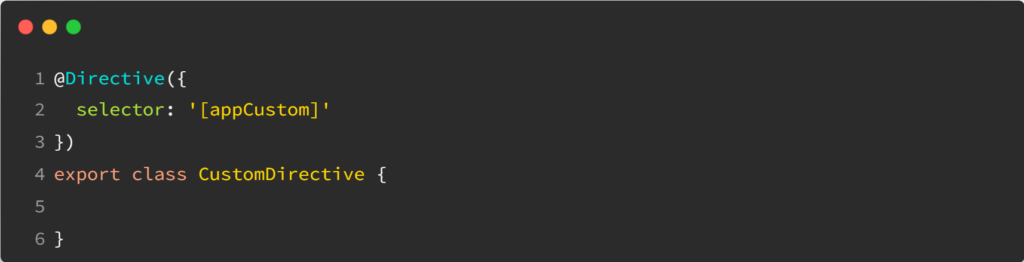
Once you’ve done that, you end up with an empty class to implement:

At that point, it’s important to remember that a directive is just like a component. The only difference is that a directive doesn’t have an HTML template. As a result, we can still use @Input(), @Output(), and all sorts of bindings and listeners.

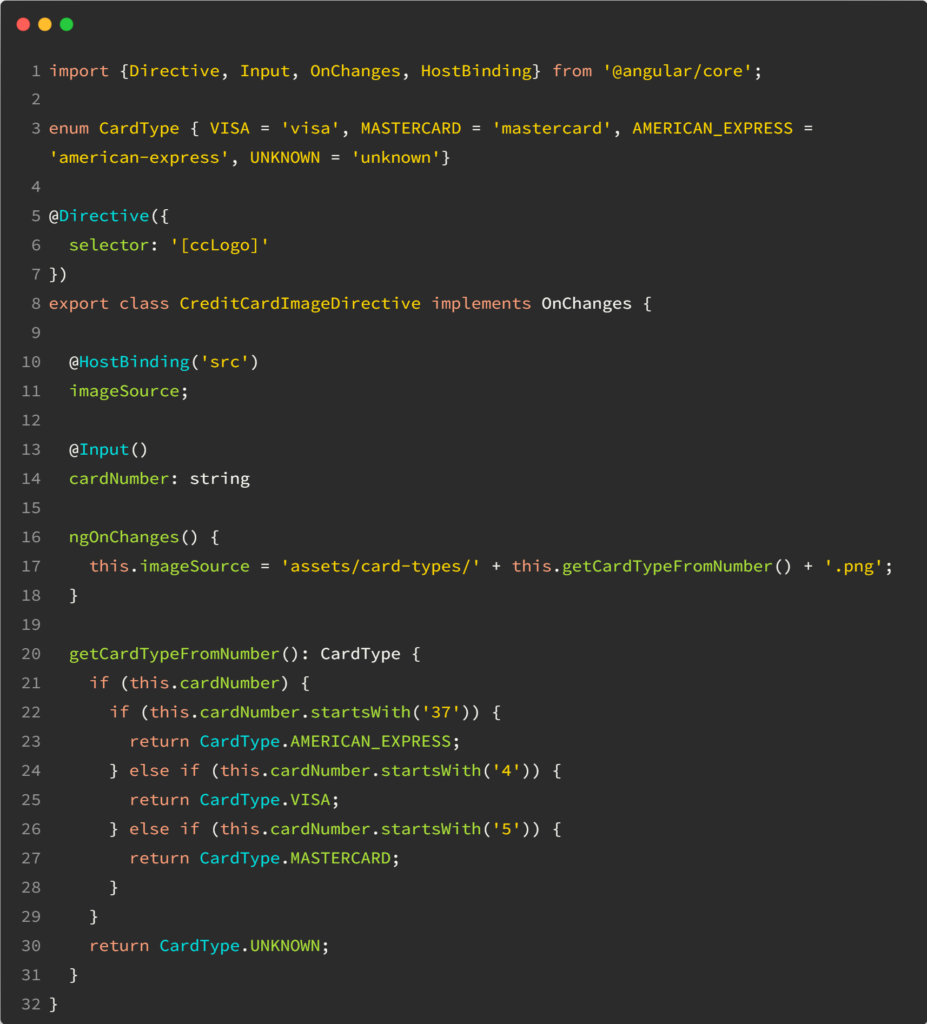
As a result, your directive will manipulate HTML attributes and events on its host element. Here is a typical example of a custom directive that sets a credit card logo image based on a credit card number:

Its source code looks like this:

As you can see, we use an @Input() to receive the cardNumber and a host binding to change the value of the src attribute. You can find a step-by-step tutorial that explains the above code in more detail here.

How to create custom form controls with Angular?

When working with lots of forms, you’ll likely use similar controls repeatedly: A country selection dropdown, a state selection dropdown, a date-range picker with specific constraints, etc.

Instead of duplicating our code, which is never a good idea, Angular allows us to create custom form controls that integrate with Angular’s form validation mechanism.

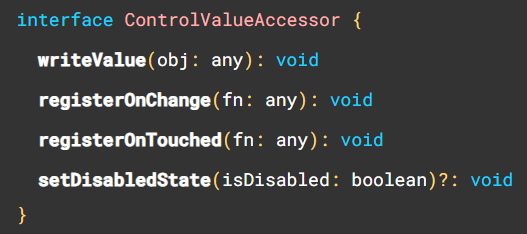
This feature requires our custom control component to implement an interface called ControlValueAccessor that has the following methods:

I have a detailed tutorial and code example if you want to dive deeper into that topic.

It’s also worth noting that you don’t have to start from scratch when implementing a control value accessor. Angular has a DefaultValueAccessor directive (the one used by FormControl, NgModel, etc., in Angular forms) that can be invoked with the selector ngDefaultControl, and there are a few more options available, such as the SelectControlValueAccessor.

How to run code in an injection context?

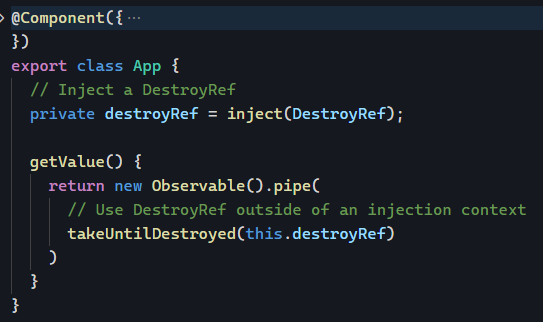
Yesterday, I introduced an injection context, and we saw a few locations where we could inject dependencies. This can be limiting in scenarios where we call a method that creates and returns an Observable outside of an injection context, as we can’t always initialize observables in a constructor. Does that mean we cannot use the takeUntilDestroyed operator in those scenarios?

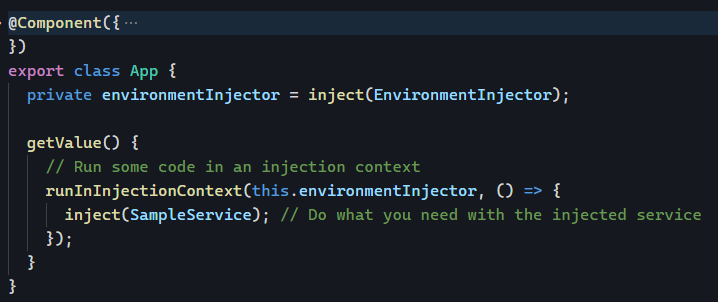
No, because we can store our injector for later use using the following approach:

The key is to use the runInInjectionContext function and pass the injector as a parameter.

For the takeUntilDestroyed operator, we can inject a DestroyRef in our injection context and then use it as a parameter whenever we need that operator:

Problem solved! We can use all these tools from the framework in any place we want, thanks to EnvironmentInjector and DestroyRef.

What’s an injection context?

In the past few months, the introduction of the inject() function and the takeUntilDestroyed operator shared something important: While these features are based on functions, these functions have to run within an Angular injection context, or you’ll get errors from the framework.

That’s because Angular relies on dependency injection for almost everything. As a result, it’s helpful to know what is an injection context.

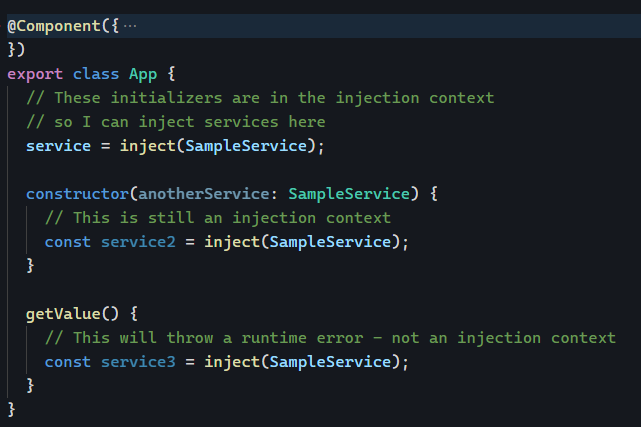
The most apparent injection contexts are these:

  • Constructor of an “Angular class” such as services, components, directives, pipes, etc.
  • In the initializer for fields of such classes.

Here is an example of what is and isn’t an injection context:

Other places are injection contexts:

  • In the factory function specified for useFactory of a Provider or an @Injectable.
  • In the factory function specified for an InjectionToken.
  • Within a stack frame that is run in an injection context.

In other words, this is when you’re configuring a module or dependency injection. The most common examples are related to the router – guards, resolvers, and such are all in the injection context, so we can inject dependencies there:

Pluralizing text with the i18nPlural pipe

Pluralizing is as natural in human language as it is painful to handle programmatically. Let’s say we want to address the following scenarios in an app that displays the number of posts:

  • If we have zero, display “No post.”
  • If we have one, display “1 post.”
  • If we have more than one, say 5, display “5 posts.”

We could use a combination of ngIf / else scenarios to handle this, but it would get ugly quickly. The upcoming control flow API would help, but it’s not available yet.

Instead, we can use the i18nPlural pipe as follows:

The above syntax determines what to display for each scenario: 0,1 or any other value. You can find an example here on Stackblitz.

Combining multiple Observables with ngrxLet

Last month, I explained how to use ngrxLet to render a loading template. Earlier this year, I also covered how ngrxLet can be a great alternative to the async pipe. All in all, ngrxLet is a fantastic directive that keeps improving.

For instance, we can also use it to combine multiple different Observables into one local variable as follows:

Without ngrxLet, the equivalent code would have to use the async pipe syntax trick covered last week:

This also works, but it’s more verbose and has the downside of using ngIf, which is present only because we need a structural directive to enable the local variable assignment micro-syntax.

How to use HTTP interceptors?

Angular HTTP interceptors can intercept and modify HTTP requests and responses. They can be used for a variety of purposes, such as:

  • Logging the details of HTTP requests and responses, such as the URL, headers, and body. This can be helpful for debugging and troubleshooting.
  • Authentication: Authenticate requests before they are sent to the server by adding custom headers to the HTTP request.
  • Caching: Interceptors can be used to cache HTTP responses, improving performance.
  • Error handling: Handle errors that occur during HTTP requests. This can help provide feedback to the user when the connection with the server is lost.

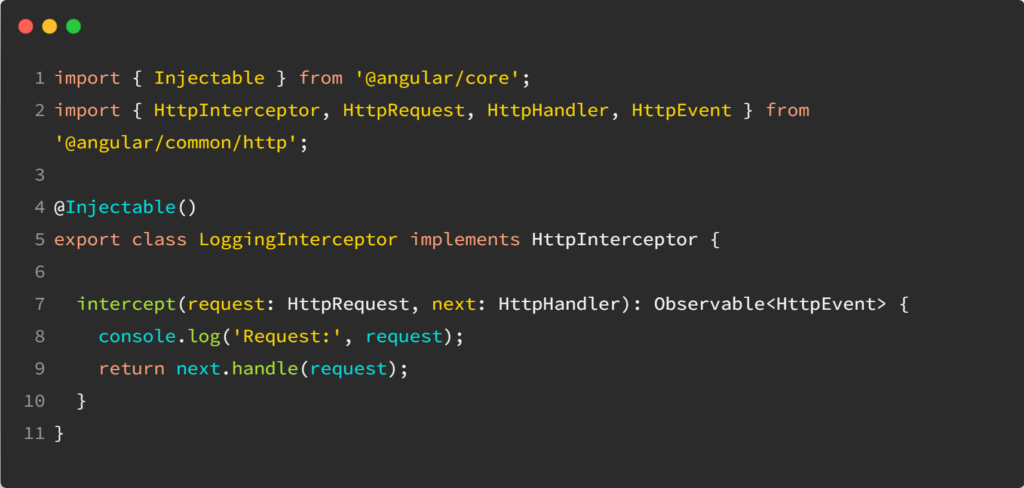
To create an Angular HTTP interceptor, you must create a class that implements the HttpInterceptor interface. The intercept() method of this interface is called whenever an HTTP request is made.

This method allows you to inspect and modify the request before sending it to the server.

Here is an example of an Angular HTTP interceptor that logs the details of HTTP requests:

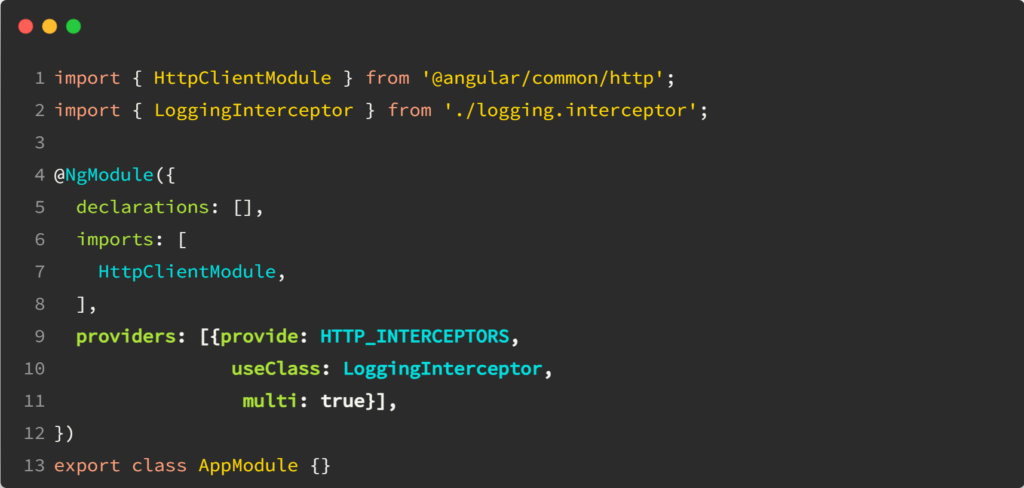
To use an Angular HTTP interceptor, you need to register it. You can do this by adding the interceptor to the providers array of your AppModule as follows:

Once you have registered an HTTP interceptor, it will be called whenever an HTTP request is made.

You can see a complete example of how to intercept a request to add an auth token in this tutorial. The tutorial also covers how to intercept a response and change it. A complete example of such an interceptor can be found on Stackblitz.