Anti-pattern: Not using production builds to deploy production code

This is one of the most common mistakes I see with my training/consulting clients. When deploying code to production, they would use the command: ng build.

Instead, you want to use: ng build --configuration=production

Why is that? Because a production build is optimized in several ways:

  1. The code gets minified and obfuscated, which means it looks like this when running in a browser:
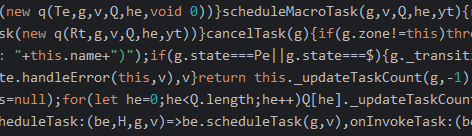
This code is as lightweight as possible (no tabs, whitespace, new line characters, variables have super short names, etc.) and a lot more challenging to understand (a hacker would have a harder time understanding your code).

2. The code gets tree-shaked. Angular removes unused dependencies and dead code and makes your build output as tiny as possible. Size matters on the web: The less code you ship to a browser, the faster it gets downloaded, parsed, and interpreted (which is also why Angular gives us lazy-loading capabilities)

3. Source maps are not generated in that same spirit of hiding what our source code looks like.

4. Angular DevTools are disabled on that code, again for obfuscation and reverse-engineering purposes.

If you’re still not convinced after reading all of this, give it a try on your Angular projects. The size of your dist folder after a production build should be at least 90 to 95% smaller compared to a regular build, which is massive.

HostBinding and HostListener

A few months back, I suggested that Angular developers don’t use enough directives and use too many components. This is because components quickly become second nature when writing Angular code, while directives are less common and, as a result, can feel more complex at first.

The critical difference between components and directives is that components have an HTML template, and directives don’t. That lack of a template can be slightly uncomfortable at first unless you realize that you still have access to HTML attribute bindings but in a different manner.

For instance, let’s consider the following component template:

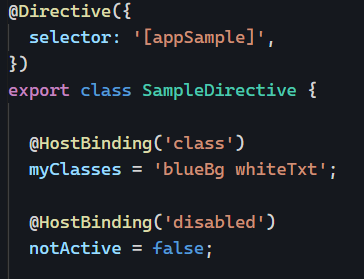
Those two bindings used in a directive would become:

In other words, when you see a binding with [] in a component, @HostBinding() does the same thing in a directive.

For example: [id]="testId" in a component template becomes @HostBinding("id") testId; in a directive class.

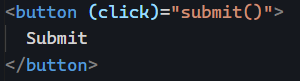
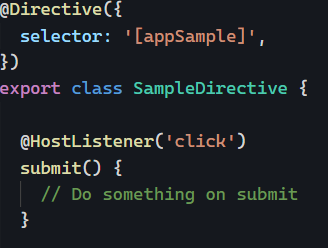
The same goes for event listeners. This component (click) binding:

Becomes the following in a directive:

As a recap: [] become @HostBinding and () become @HostListener. Those are the same thing. That’s it. No template is needed. For a real-life example of a custom directive, feel free to take a look at this tutorial of mine.

Signals: computed()

After introducing how to create Signals and how to update them, let’s take a look at one more exciting feature that helps replace the need for RxJs Observables.

How to emit a new Signal value when one or more Signals get updated? That’s what computed() does. In my Signals course, I illustrate computed() with the following example:

In the above code, this.rates() and this.currency() are two different Signals. this.rates() emits up-to-date exchange rates for all currencies in the world. this.currency() emits the current currency selected by the user.

computed() takes a function as a parameter. The function returns the computed value from my two Signals; in this case, the up-to-date exchange rate for the current currency. If the exchange rates or the currency get updated, this computed Signal will emit an updated value automatically.

This is somewhat similar to combining several Observables and using switchMap or combineLatest to get a customized result. It’s a lot easier with Signals (one line of code!).

Anti-pattern series: Using too many services

While services and dependency injection are good, just like many good things in life, they can be over-used and become somewhat of an anti-pattern.

Why? Because of how change detection works in Angular. Angular has two modes for change detection: The default mode and the onPush mode. onPush is an optimization that works if and only if you’re using input-driven components, also known as presentation components.

In other words, whenever you inject a service into a component, you prevent that component from using the optimized onPush change detection mode. This is one of the reasons best practices recommend sticking with container components (service-driven components tied to specific use cases) and presentation components (input-driven ones that can be used and reused as they’re not connected to any service – and any business logic).

The more presentation components you create, the more reusable your code is, and the more change detection can be improved. The next time you inject a service in a new component, think again: Could I pass that data as @Input(s) instead of injecting a service?

If so, congratulations: You just prevented your presentation component from falling into this anti-pattern.

Skeleton loaders with Angular

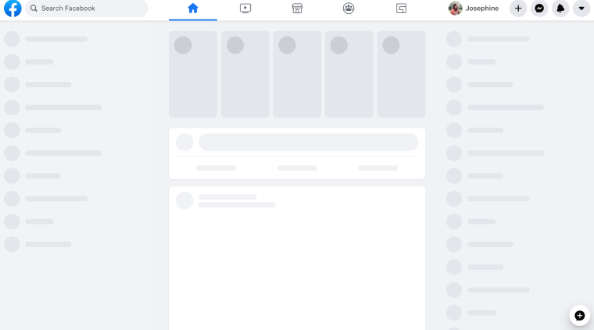
Skeleton loaders are grey-shaded shapes that indicate when a part of the screen is loading. Here is an example of skeleton loaders for Facebook:

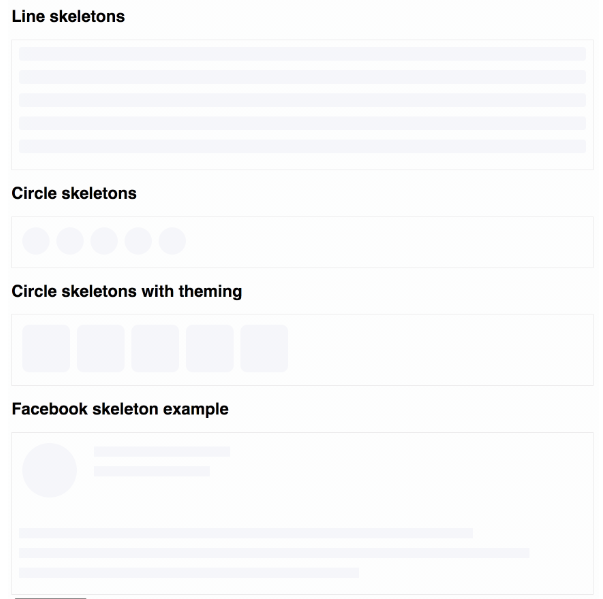
ngx-skeleton-loader is a small component library that does just that. It gives us access to different skeleton loaders ready to be used in our applications:

What’s nice about that library is that we can customize different aspects of the skeletons, such as animations and colors. You can find some live examples here.

If you want to explore skeleton loaders for your application, feel free to look at my popular tutorial: How to use a skeleton loader with Angular?

The tutorial has several code examples that can be used as-is.

Two ways to update Angular Signals

Yesterday, I wrote about some best practices around exposing a Signal in our Angular applications. Let’s now take a look at the two different ways a Signal can be updated.

set()

The easiest way to update a Signal is the set() method. Nice and easy for basic data types such as strings or booleans:

update()

When the new value of a Signal depends on its previous value, update() is the best method to use. This is the ideal method for a counter, for instance:

Here is how to increment the counter based on its current value:

TL;DR

  • When you need to update a simple value (string, number, boolean), use set().
  • If that new value is based on the previous one, use update() instead of set()

Anti-pattern series: Not unsubscribing from Observables

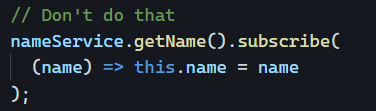
We covered this in our newsletter before: Observables can cause memory leaks if we don’t unsubscribe from them.

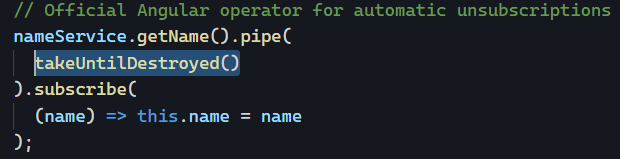
Before Angular 16, there were a few different techniques available to unsubscribe automatically, the best of those being the async pipe (and yes, it’s possible to use the async pipe 100% of the time if you use the tricks highlighted here – no excuses).

With Angular 16, things are even better, as you can use the new takeUntilDestroyed operator as follows:

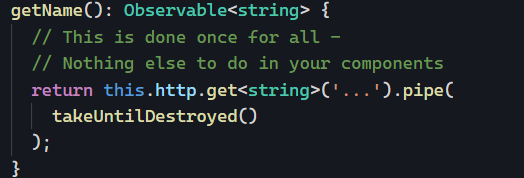
But here’s my million-dollar tip for today: Instead of using takeUntilDestroyed in your components, use it in the services that expose such Observables:

That way, whether you use an async pipe or not, your components are covered. That’s one of the nice things about Observables: We can change them whenever and wherever we want using pipe(), including in our services – so that all subscribers benefit from that change downstream.

Angular at Google I/O

This a very short post today as I spent most of my day at Google I/O, the annual conference where Google announces all sorts of updates ranging from AI to Android to Web, including Angular.

The Angular team had a few talks on Angular 16, all of which are now available on YouTube so that you can watch them too:

They also published a list of shorter videos (2 to 6 minutes) on Angular 16.

Signals: Why and when do we need them?

With the release of Angular 16, Signals are now available as a developer preview, which means we can start learning about Signals, testing them, and possibly adopting them.

The end goal of Signals is simple: Improve change detection in the Angular framework by removing the need for Zone.js. A signal-based application will be able to update individual views (a view is a sub-set of a component template — we create new views every time we use structural directives such as ngIf or ngFor) one by one instead of checking the entire component tree, enabling laser-focused updates of our DOM.

A secondary goal is to make Angular easier to learn by making RxJs less critical than before, which also applies to state management libraries such as NgRx or NgXs. In other words, we can rely less on operators, subjects, and the like.

Now that we covered the why, let’s talk about when to use signals. To get the full benefit of Signals in the long run, using them everywhere we have Observables or data bindings makes sense. I know this sounds like a lot of work, but that’s how we can get to a point where Angular can tell exactly which components must be updated when a value changes, no matter their location in the DOM tree.

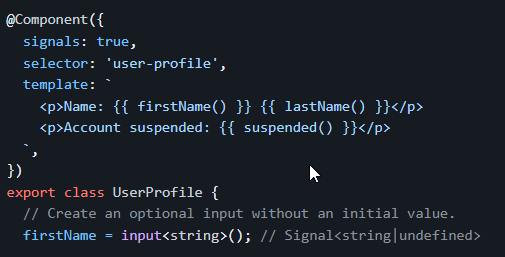
An upcoming feature of Angular (v17 or later) will be signal-based components, where inputs, outputs, and even two-way bindings will be expressed as Signals:

I believe it makes sense to start using Signals as soon as possible. The base API is available in Angular 16 and is easy to learn. I already published a course that will be continuously updated as Signals evolve.

If you have any specific questions or concerns, feel free to send me your questions. I’ll be covering more about Signals as part of this newsletter.

Anti-pattern series: Calling a method in a template

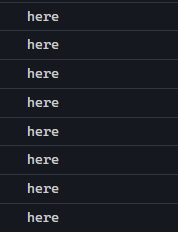
If you’re calling a method/function in the HTML template of any of your components, try the following experiment: Add a console.log("here") inside that method.

Then, interact with your application by clicking around, entering information in a form, etc. What you’ll see in your console is something like this:

Why is this happening? Angular’s change detection runs every time an event occurs in the browser. Zone.js tells Angular that “something happened” when we interact with an Angular application. Then, Angular checks its component tree for updates. If you’re using methods in your HTML templates, the only way for Angular to see if the output of that method has changed is to… call it again.

As a result, using methods in your HTML templates is not recommended. Doing so can impact performance negatively. Instead, use bindings to class properties as follows:

Before:

After:

Note that if you need to call a method/function to perform some formatting, you should create a custom pipe. Pipes are designed to run only when their input data changes, which means they are optimized for best performance by default.

You can take a look at an example here on Stackblitz. I added a console.log("here") inside my custom pipe to showcase that it runs only once: