Angular file naming conventions (and how to fix them)

In a recent and surprising move, the Angular team decided to remove the file suffixes it had been using since Angular 2, such as: dashboard.component.ts or user.service.ts.

The rationale is that IDEs have become good enough to find what we need, no matter the file name. And that the new convention is closer to React and other TS-based frameworks/libraries. While that is true, clarity, conventions, and naming rules are what make Angular the technology of choice for many of us.

At every single event I attend and every single Q&A I participate in, the question always comes up: Why did the Angular team do that? Nobody asked for it! We hate it!

As a result, today, I’ll show you how to break the new rules. First, if you want to keep the legacy behavior with individual CLI commands, you can do: ng generate component Dashboard --type=component

This will restore the “suffix” we grew accustomed to. If we want to make that change more permanent, we can edit angular.json and add the following schematics config:

"schematics": {
  "@schematics/angular:component": {
    "type": "component"
  },
  "@schematics/angular:service": {
    "type": "service"
  },
  "@schematics/angular:directive": {
    "type": "directive"
  }
}Code language: JavaScript (javascript)

Note that the above doesn’t list pipes, because pipes escaped the new renaming rules, to some extent: Instead of the old custom.pipe.ts, the new convention is custom-pipe.ts. I can live with that one, and the CLI doesn’t really allow overriding that behavior anyway.


How to migrate Angular syntax to the latest features?

I posted about how to update your version of Angular a while back. Still, with the ongoing updates in the framework, such as standalone components, the new control flow syntax, and the inject() function, there are quite a few new options that aren’t required but can still be adopted widely.

For instance, if you want to remove your ngModules and go full-standalone; there’s a migration command for that:

This command will ask you about different options, such as removing unnecessary ngModules, and switching your AppComponent to standalone bootstrapping.

If you want to get rid of NgFor, NgIf, and the like, you can migrate automatically to the new control flow syntax with:

Another migration command was added in Angular 18.2. This one is to migrate your dependency injection syntax to use inject() instead of constructors:

Finally, and also added in Angular 18.2, is the migration to use lazy-loading on all routes:

This last command can be applied to a subset of routes by using the path argument:

The official documentation for all these migrations can be found here.

How to update your Angular CLI?

We touched on many Angular 17 updates so far, and if you want to test those out on a fresh new project, you’ll need to upgrade your Angular CLI to v17.

Here is the most straightforward command to upgrade your global Angular CLI to the latest version:

npm install -g @angular/cli@latest

That’s it! The -g flag indicates we want to install that CLI globally, and the @latest at the end ensures we’re getting the latest stable version.

Anti-pattern: Not using production builds to deploy production code

This is one of the most common mistakes I see with my training/consulting clients. When deploying code to production, they would use the command: ng build.

Instead, you want to use: ng build --configuration=production

Why is that? Because a production build is optimized in several ways:

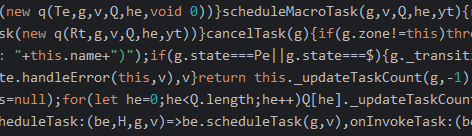
  1. The code gets minified and obfuscated, which means it looks like this when running in a browser:

This code is as lightweight as possible (no tabs, whitespace, new line characters, variables have super short names, etc.) and a lot more challenging to understand (a hacker would have a harder time understanding your code).

2. The code gets tree-shaked. Angular removes unused dependencies and dead code and makes your build output as tiny as possible. Size matters on the web: The less code you ship to a browser, the faster it gets downloaded, parsed, and interpreted (which is also why Angular gives us lazy-loading capabilities)

3. Source maps are not generated in that same spirit of hiding what our source code looks like.

4. Angular DevTools are disabled on that code, again for obfuscation and reverse-engineering purposes.

If you’re still not convinced after reading all of this, give it a try on your Angular projects. The size of your dist folder after a production build should be at least 90 to 95% smaller compared to a regular build, which is massive.