What is ng-container?

Yesterday, we covered ng-template and touched on different scenarios when it makes sense to use ng-template. Let’s now introduce a close relative of ng-template called ng-container.

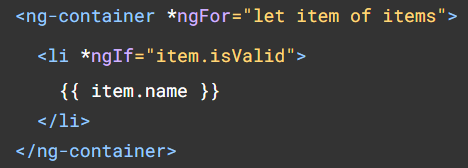
There are a lot of similarities between those two elements, which can both be used to use structural directives such as ngIf or ngFor, with the bonus that ng-container can be used with the shorthand syntax of those directives:

One thing you probably noticed as an Angular developer is that we can’t use two structural directives on the same element:

In this scenario, using ng-container is the perfect way to use both directives without adding any HTML to the DOM, as ng-container, just like ng-template, doesn’t create new DOM elements:
Another use for ng-container is to become the host of a ng-template, similar to the way that a router-outlet is the host of routed components:

Such templates can be passed from a parent component using @Input and let the child component decide when to display which template, which is very powerful:
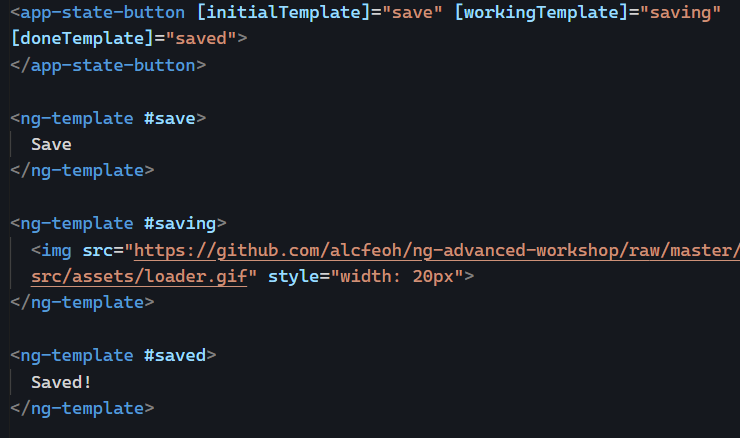
You can find a complete code example of such a feature in this Stackblitz and a more in-depth tutorial here if you want to try it.
Using services to cache data

Yesterday, we saw that services are singletons that are created once for all and stay in memory as long as the application is open.

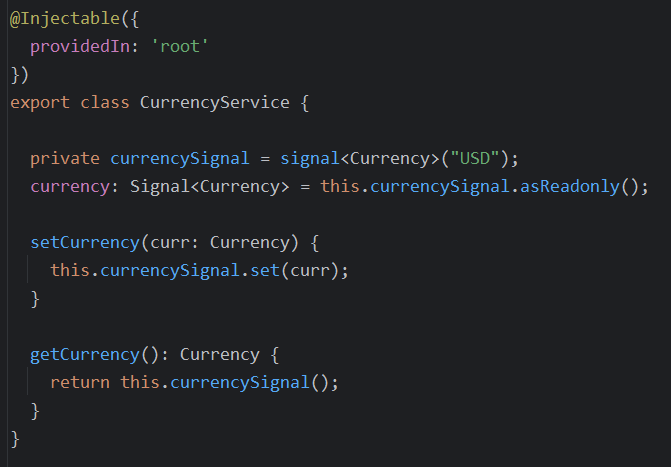
This makes our services the best place to store data that can be shared between multiple different components. Such services can use BehaviorSubjects or Signals to cache that data and replay the last value automatically to any new subscriber (component, directive, pipe, service, etc.).

Here is an example using a signal to store a value and expose it in a read-only fashion:

This article compares BehaviorSubjects and Signals to cache a shareable value.

How to pass multiple pieces of content from one component to another?

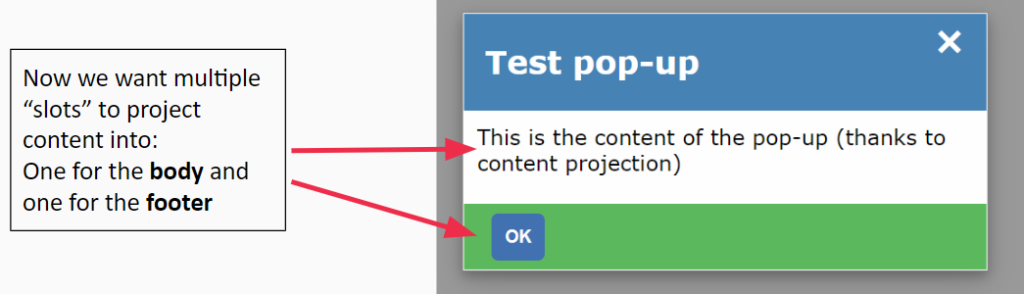
Yesterday, we saw that we could use content projection to pass an HTML template from one component to another. But what if we want to pass multiple different templates? We can use multi-slot content projection.

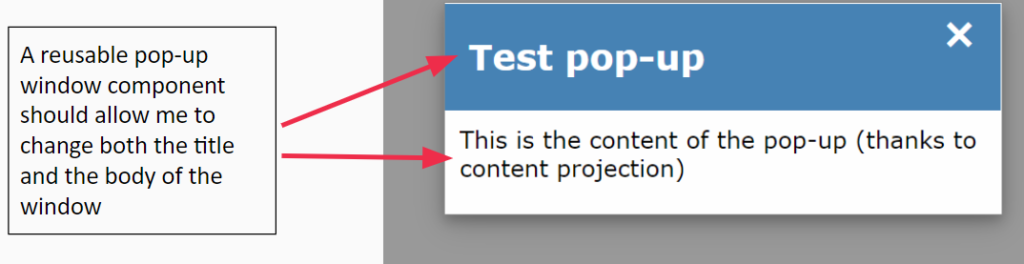
Here’s what we want to achieve:

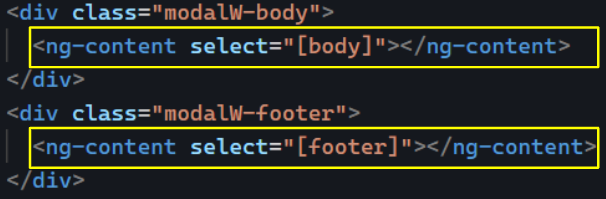
In our reusable dialog component, we will have multiple ng-content elements. Each ng-content will have a specific query selecting a template to render:

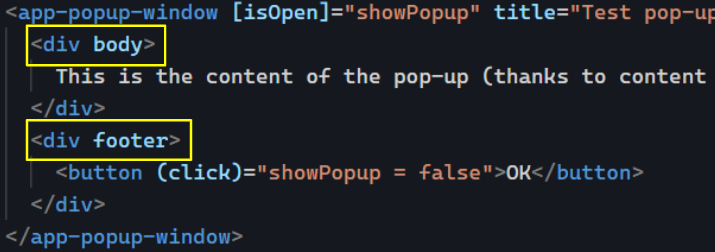
These queries use the CSS selector syntax. In the above example, we’re using [], which means we are selecting HTML attribute names. As a result, our parent component will pass two distinct templates, one for the body and one for the footer, using the following syntax:

You can see an example of such code in action on Stackblitz.

Passing custom content to a component with content projection

If you’re creating a component library or working on components meant to be as generic and reusable as possible, then content projection should be a major part of your Angular toolkit.

Let’s take the example of a pop-up window/dialog component:

The main idea of content projection is that the parent component (most likely a container component) knows about the current use case of our reusable presentation component and can pass custom HTML to it. Such content is passed in the content section of the component, which is the body of the HTML element – what we have between the opening and the closing tag:

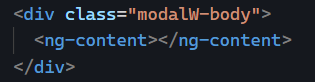
Angular projects that content into the template of the child component. We can set the destination of that projection by using an ng-content element in the template of the reusable component as follows:

Content projection is like cutting and pasting some content from one component to another. You can see the full code example here on Stackblitz.

How to improve performance with pure pipes

Earlier in this newsletter, we saw that calling a method in a component template is an anti-pattern. The antidote to that anti-pattern is to use a pure pipe.

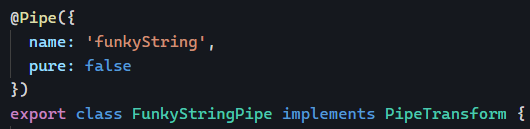
By default, all pipes we use in Angular are pure. Custom pipes are also pure by default. The only way to make a pipe impure is to add the config option pure: false to its decorator:

What is a pure pipe?

A pure pipe is one that Angular will execute only when there is a pure change to its input value. It is automatically optimized for performance since it is executed only when needed.

A pure change is either a change to a primitive input value (such as string, number, or boolean), or a changed object reference (such as Date, Array, or Object).

In other words, if we consider the following use case:

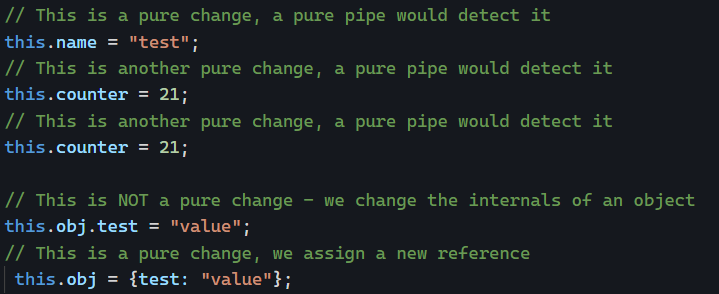
Here are some examples of pure and impure changes in variables:

With all that information, we are now equipped to call a formatting function in a template by using a pipe (said function would be called in the transform method of the pipe). We know that the function would run only when the input value changes (purely), which allows us to decide when we want that pipe to be executed again by making either a pure or an impure change to the input value.

Finally, we can double-check that our pipe is working as expected using the Angular profiler to make sure that the pipe doesn’t run more often than expected.

How to create a generic error handler with Angular?

Earlier in this newsletter, we covered how to handle errors with RxJs Observables. What about errors in the rest of the application? Javascript has a primary try/catch mechanism, but this doesn’t help handle errors in a generic, unified way.

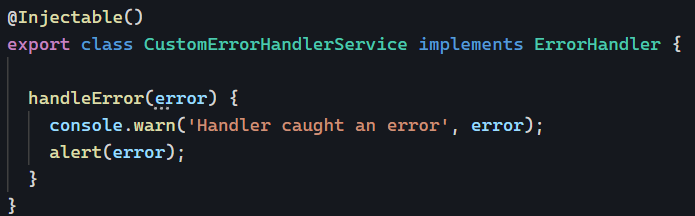
Fortunately enough, Angular has an ErrorHandler interface that can be implemented by global error handler services such as this one:

That way, we can implement a catch-all method to deal with errors and display them to the user consistently (code example here). Even better, such a service could report errors to a server for further investigation and debugging from the dev team.

Here is a link to my custom error-handling tutorial to see a good example of how to implement a ErroHandler service.

Anti-pattern: Subscription within a subscription

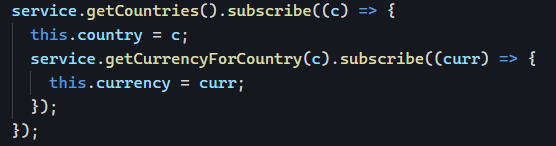
Welcome to this new series on Angular anti-patterns. I intend to cover one anti-pattern per week for a few weeks, starting with one of the most common ones: Subscribing to an Observable within another Observable subscription. Here’s an example where we get a country and then the currency for that country:

Why is this a bad idea? Here are a few reasons:

  • getCurrencyForCountry() is never unsubscribed, which can lead to memory leaks.
  • When the country changes, the Observable that gets the previous country’s currency is not canceled. If that Observable emits again, this.currency will get overwritten.
  • Such nested callbacks are hard to read, and as a result, such code is more challenging to maintain.

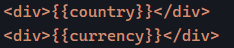
Let’s imagine our component template is as follows:

Then in a scenario where getCurrencyForCountry() emits updates values every second, our component would end up displaying the following values, which become wrong very quickly:

You can take a look at that code here.

The solution to avoid such issues is to use the switchMap operator as follows:

The above code works fine because switchMap cancels the previous currency Observable as soon as a new country is emitted from service.getCountries(). No more memory leaks, and our two Observables are always in sync:

Here is a link to that same code example using the switchMap operator.

Conditional Dependency Injection

Yesterday, we saw how to use our component (and module) hierarchy to configure dependency injection with Angular.

Today, let’s look at how we can make dependency injection conditional. For instance, say we have a LoginService for production that requires features unavailable at dev time or that we do not want to use during the development phase.

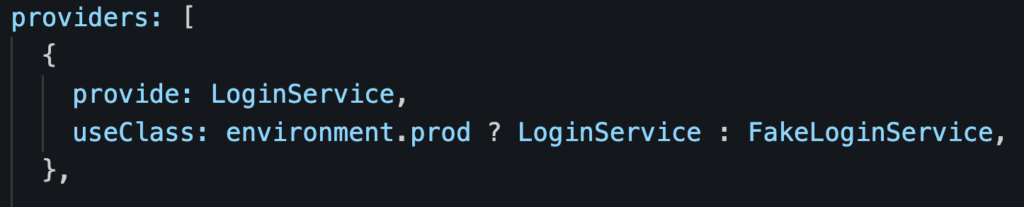
What we can do then is configure our providers to make a decision based on the current environment:

Using the ternary operator [if true] ? [then this] : [else that], we can decide when to use a service over an alternative version.

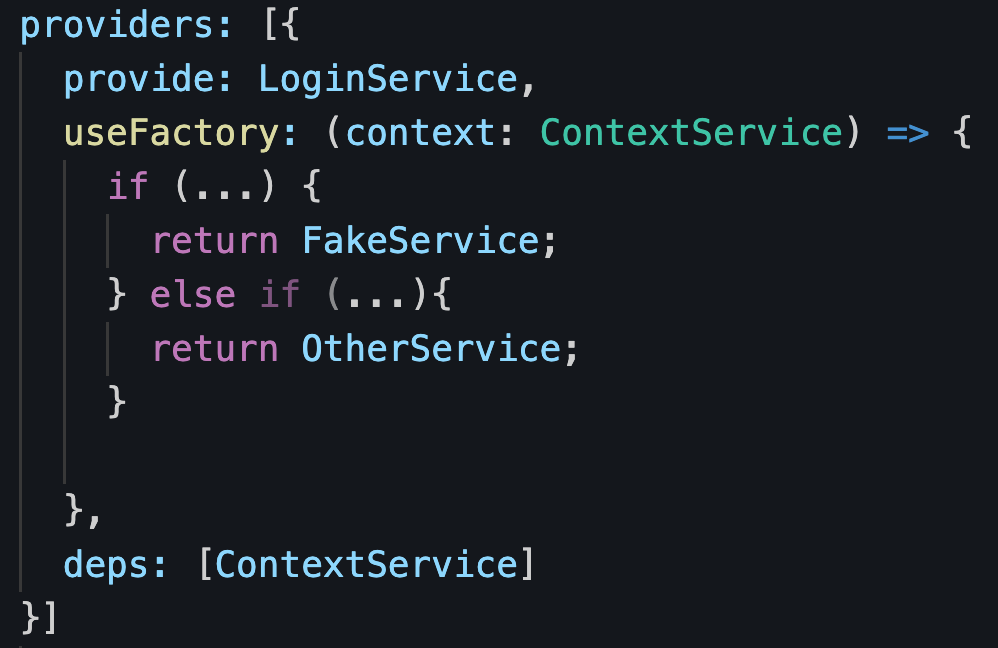
If you need to make that dependency injection decision depending on other factors, such as data from other services, or if you have several different possible services to inject, you can use a factory function that relies on other services (deps) that are injected in the factory function as follows:

The order of the dependencies in deps has to match the order of the parameters in the factory function passed to useFactory.

Angular Signals are in the works!

This is probably the most significant change coming to the framework since the release of Angular v2 many years ago.

A new feature called Signals is being prototyped in Angular, and we can follow the entire discussion on GitHub.

Where do signals come from?

They are the answer from the Angular team to several different requests from the developer community over the years, more specifically:

  • Being able to use Observables with @Input
  • Being able to use Angular without Zone.js to have more control over change detection.
  • Having state management built-in with the framework so we don’t need libraries like NgRx or NgXs anymore.
  • Being able to use Angular in a reactive way without relying on RxJs.

In other words, Signals will be a clear and unified model for how data flows through an application and will work without any dependency (no RxJs, Zone, or other third-party library needed).

Will we have to change everything in our apps?

No, because the Angular team has communicated that:

  • Signals will be optional, and the current way of working with Angular will remain in place.
  • Signals will provide ways to play nicely with RxJs (a Signal can be turned into an Observable and vice-versa)

What will signals look like?

It’s still early to have a definite API. We’re not 100% sure what signals will look like, but the early prototype API looks like this:

Creating a signal with a default value (of 0 in this example)

The above line of code would be very much like doing const counter = new BehaviorSubject(0);

Setting a new value to a signal

Updating a value derived from the current value

Updating a value within a signal (mutation of the internal state)

Displaying the value of a signal in an HTML template or Typescript code

The above would be the equivalent of counter | async when using RxJs. The nice thing is that with Signals, there will be no more .subscribe() and .unsubscribe().

If you want to dive into more details, here is the documentation of the current prototype. Again, this is still early and I would not expect Signals to become fully available before Angular 17 or 18, but this is very exciting nevertheless!

Standalone Application and Router config

With this daily post, let’s get back to the new Angular standalone features. So far, we have seen how to create standalone components, add dependencies, and lazy-loading of standalone components.

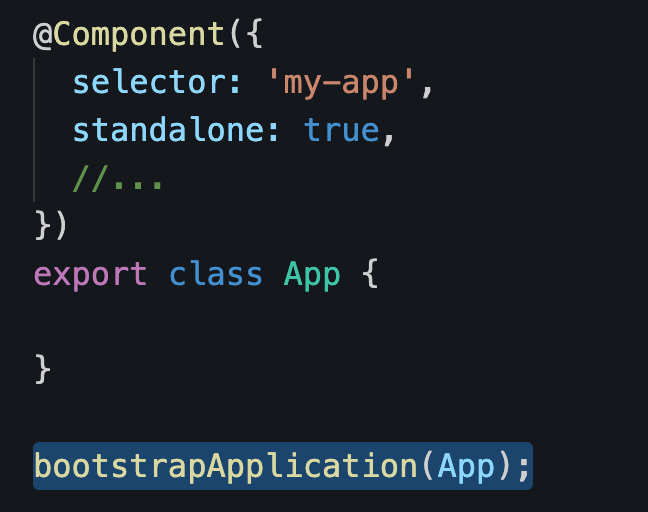
Since the primary goal of standalone components is to have less NgModules, what about creating an Angular application with no NgModule at all?

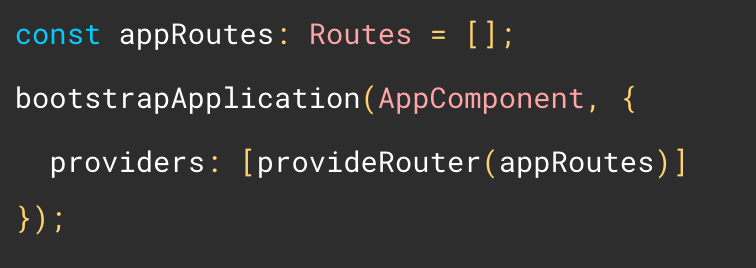
Enter the bootstrapApplication function (from @angular/platform-browser). All it needs is the root standalone AppComponent as a parameter:

And that’s it. No AppModule needed. Now you’re probably wondering: How to add some router config?

There’s a provideRouter function for that, along with several router utility functions to configure preloading, guards, error handling, and more:

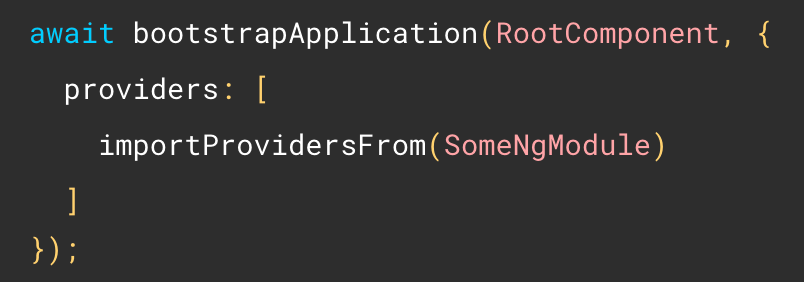
Last but not least, if you need to use services from a third-party module and don’t want to import the other features of that module (components/pipes/directives), you can also do the following:

As you can see, standalone components have paved the way for many new function-based features (instead of classes/services), and we’ll see even more of those in the coming posts.